
Prepare
Character sheets that calculate themselves
A sheet is not a form to fill in: it is a model you define once, and which keeps itself up to date afterwards. You decide on the attributes, the skills, what is calculated and what is typed in.
- Seven kinds of value: whole numbers, decimals, text, yes/no, choice lists, formulas and derived values. A percentage skill, a modifier, a success threshold: it all models.
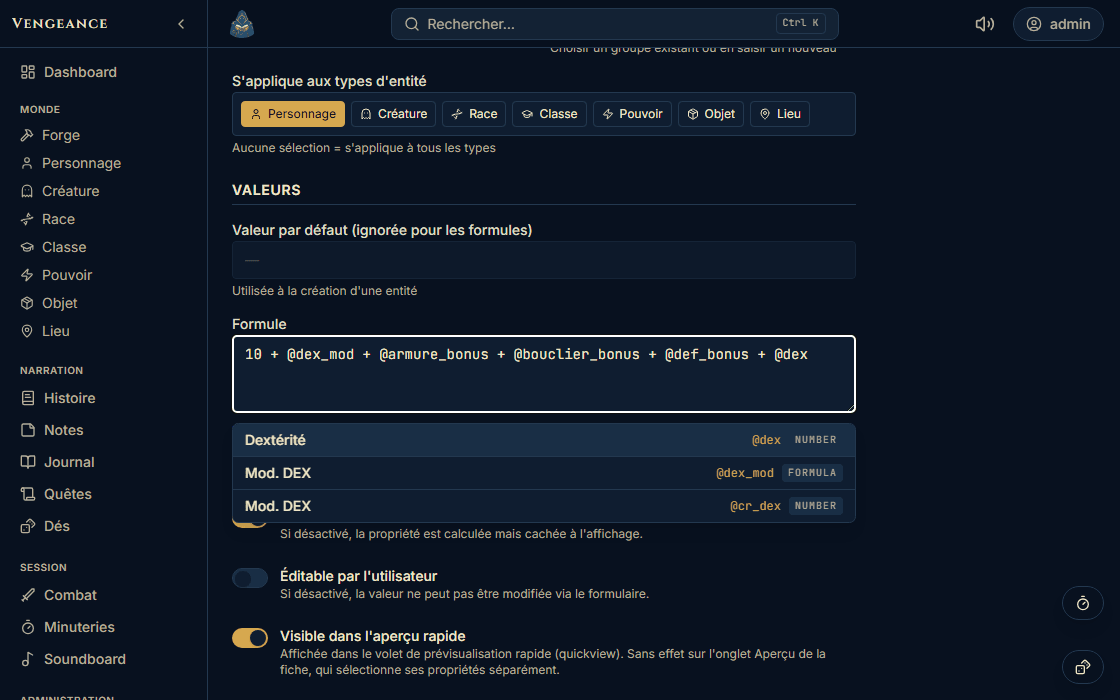
- Your formulas are written in plain language: @strength * 5, @level >= 5 ? 2 : 1. The editor completes references as you type, flags a syntax error at its exact position and detects circular dependencies before saving.
- The sheet always separates the base value from the bonus received: 14 and +2, not 16 with no explanation.
Bonuses, powers and items arrive on their own
- You never copy a bonus over: you declare once what each kind of sheet grants and what each other kind receives. A race grants its attribute bonuses, a class its powers, an item its effects, and you choose whether an item has to be equipped to count.
- When a value looks wrong, the sheet shows the full path of the bonus, from the class to the power, and a Modifiers tab lists every one in the world, filterable, each row pointing back to its source.
- Fix the power once: the six characters who have it are up to date. No handling, no list to go through again.
Your game system, your kinds of sheets
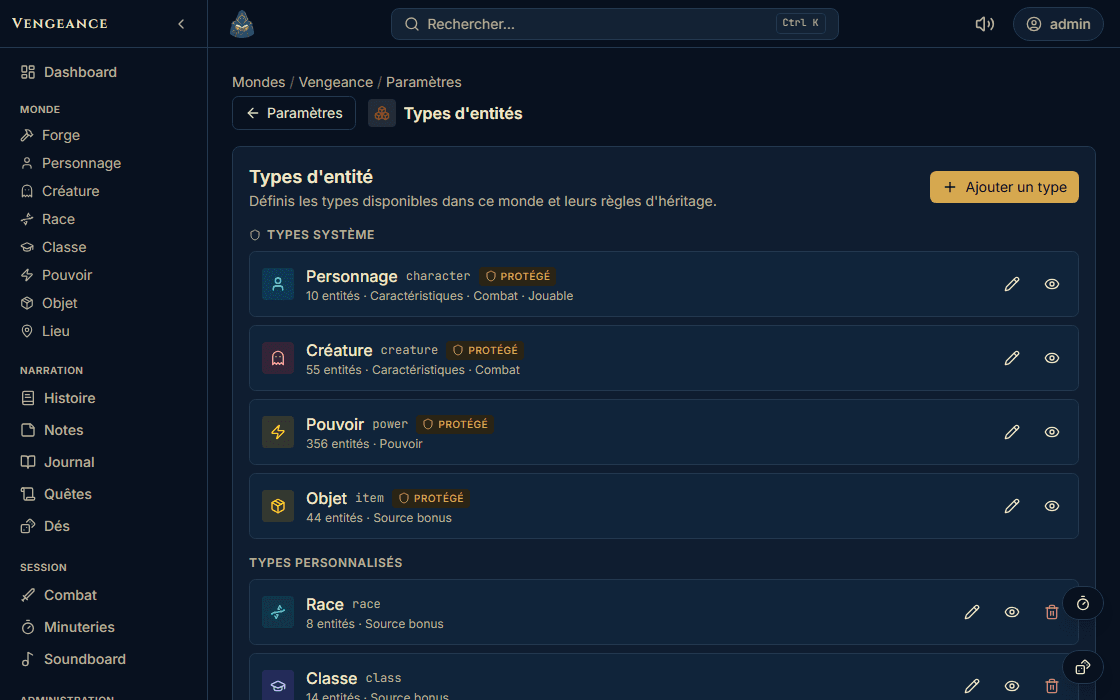
Nothing is hard-wired. Character, Creature, Race, Class, Power, Item and Place ship by default: you rename them, you hide some, you invent others.
- Rename “Race” to “Species”. Create “Faction”, “Mentor”, “Ship”, “Contract”. Each kind of sheet has its label, its icon and its colour.
- For each one, you tick what it can do: carry attributes, be played by a player, enter combat, handle a weight and a purse, grant bonuses.
- You define its free fields and its relation slots, “Class”, “Equipment”, “Territories”, with the number of links allowed and the kinds of sheets accepted.
A word about the word “entity”
In Loreward, an entity is simply a sheet: a character, a place, an item, a creature, a faction. The word is generic because the kinds of sheets, themselves, are yours: the tool does not know your game in advance. Everywhere else on this site, we say “sheet”.
Three worlds ready to play, or a blank page
- Chroniques Oubliées Fantasy: 8 races, 14 classes spread across 70 paths of 5 ranks, 350 powers, a bestiary, three currencies, and the rules summary published as seven articles your players can read.
- Dungeons & Dragons 5e (basic rules): 18 skills, 4 races and their subraces, 4 classes, 6 backgrounds, around thirty spells, a bestiary, and the mini-adventure “Les Flèches Gobelines”, playable as is.
- Call of Cthulhu 7e: d100 resolution, Sanity, around forty percentage skills, the bestiary of the Mythos, fifteen spells, and the scenario “Les Murmures de Blackwood”.
- A blank page: a four-step wizard for your kinds of sheets, your attributes, your currencies and your weight rules. Everything is written in one go, you never end up with a half-configured world.
Your screens are composed, block by block
- Each world's dashboard is assembled by drag and drop: counters, quick actions, playable characters, quests in progress or by status, latest sessions, campaign recap, latest sheets. And in two versions: one for you, one for your players.
- A sheet's preview is set the same way, kind of sheet by kind of sheet: description, attributes, powers, inventory, relations, bonuses received, gallery, tags. It opens in a side panel from anywhere, even in the middle of a fight.
- In both, you slot in your own text, your images and separators. A dashboard can become a campaign home screen, not just a summary.
Play
Turn order, tracked for you
A combat scene opens in seconds and stays open: reload the page, the encounter is still there.
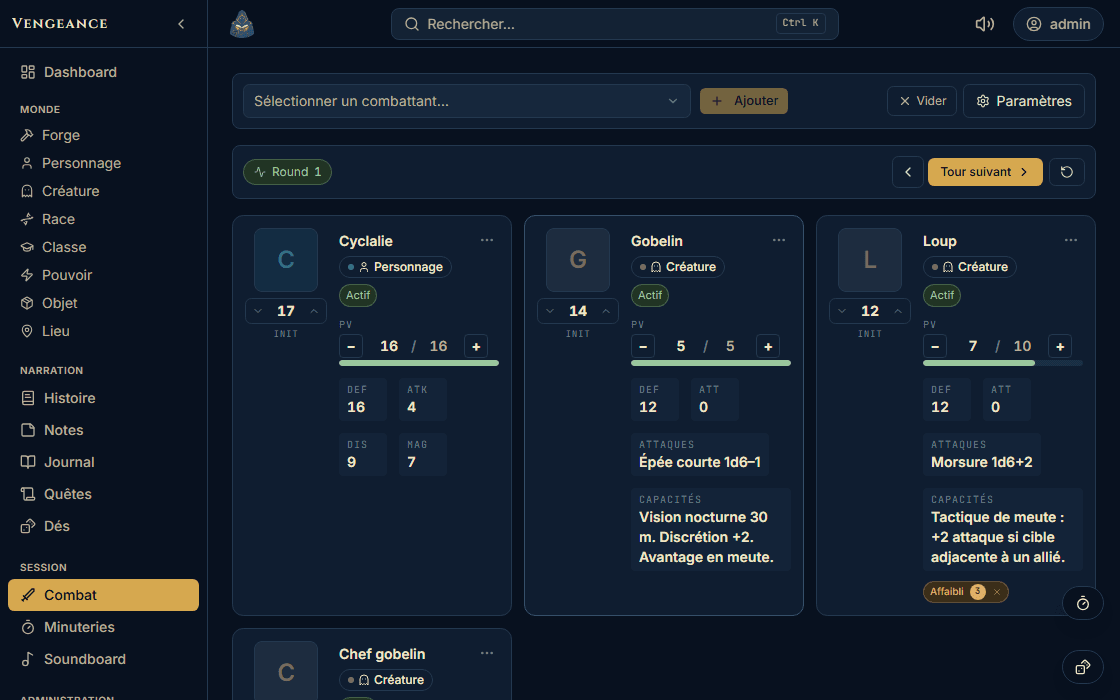
- Add any sheet declared a “combat unit”, in as many copies as you need: Goblin 1, 2 and 3 each have their own counters.
- Initiative is typed in or pre-filled from the attribute you designated. Sorting is automatic, the round is counted, the active participant is highlighted.
- Gauges change with a click and change colour at thresholds. Timed statuses count down on each round change, expire on their own, and actually change the stats on display while they are active.
Dice, for everyone
Game master and players- Full notation: 2d6+3, 4d6kh3 or 2d20kl1 to keep the highest or the lowest, and combinable groups such as 2d6+1d8+3. Discarded dice stay visible, struck through.
- A history of the last twenty rolls, replayable in one click, named favourite rolls, an optional sound, and a floating badge that follows you from page to page.
- Everyone rolls on their own device and announces their result, just like with physical dice. Loreward replaces the dice, it does not referee the table.
Ambient sound, without leaving your world
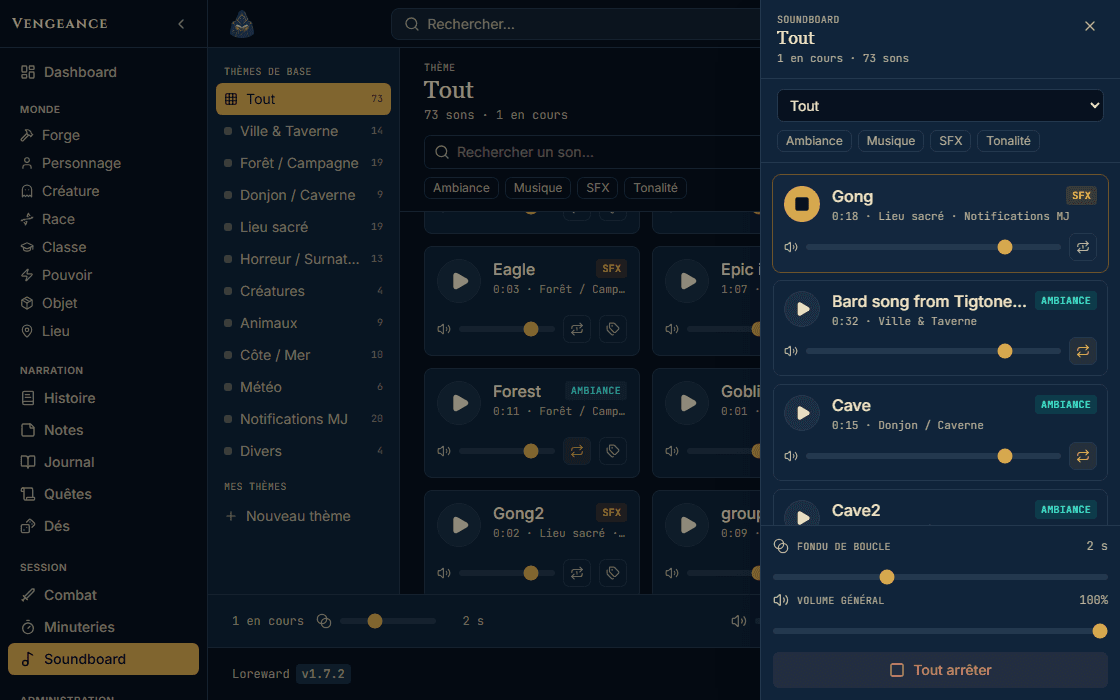
A soundboard designed as a mixing desk for your session, not as a playlist. Every world arrives with a base library; you add your own.
- Several sounds at once, rain, a campfire, a tavern theme, with a volume per sound and a master volume. Four families: ambience, music, effect, sting.
- Play once, loop or delayed repeat. Loops cross-fade over up to six seconds: the seam in the file becomes inaudible.
- Import your own files (mp3, ogg, m4a) and file them into themes. The player keeps going when you change page, and a compact panel stays available everywhere in the app.
Session timers
- Several named countdowns in parallel: “the guard comes back in ten minutes”, “end of the potion”, “sunrise”.
- A floating badge follows them from page to page, synchronised across your tabs, and picks up in the right place after a reload.
- Each one rings with a sound from your soundboard rather than a beep, and they open straight from the combat scene.
Follow and share
The story of your campaign, linked to your sheets
Four distinct spaces, because a session recap, a plot in progress, a world article and a reminder do not belong in the same place.
- The journal, one dated entry per session, public to your players or kept for you. The quests, in a tree. The history, a wiki of nested articles reorderable by drag and drop. The notes, a personal notebook per account and per world.
- Quests carry five statuses: not started, in progress, completed, failed, abandoned. They feed the dashboard blocks.
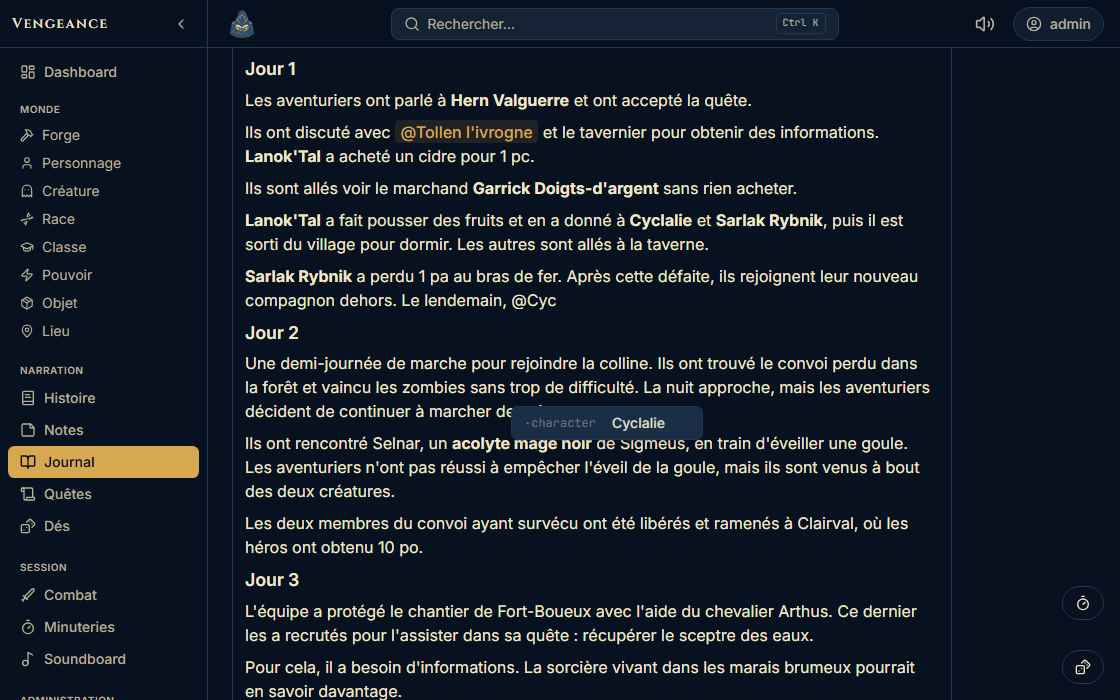
- The binding: type @ to mention a sheet, and it opens in a side preview without leaving the page. And every sheet shows in return “Appears in”: the journals, quests, articles and notes that mention it, filtered by what the reader is allowed to see.
And also, because a world ends up growing
- Global search from the keyboard (Ctrl+K) across sheets, quests and the journal, and three list views, table, simple list or cards, with filters, sorting, grouping and columns of your choosing.
- Bulk operations on up to 500 sheets at once: properties, free fields, tags, categories, power sources, deletion.
- A media library per world (images, documents and sounds up to 500 MB, with the list of places each file is used), four colour palettes to choose from, and a bilingual interface, French and English.
Your players, each in their place
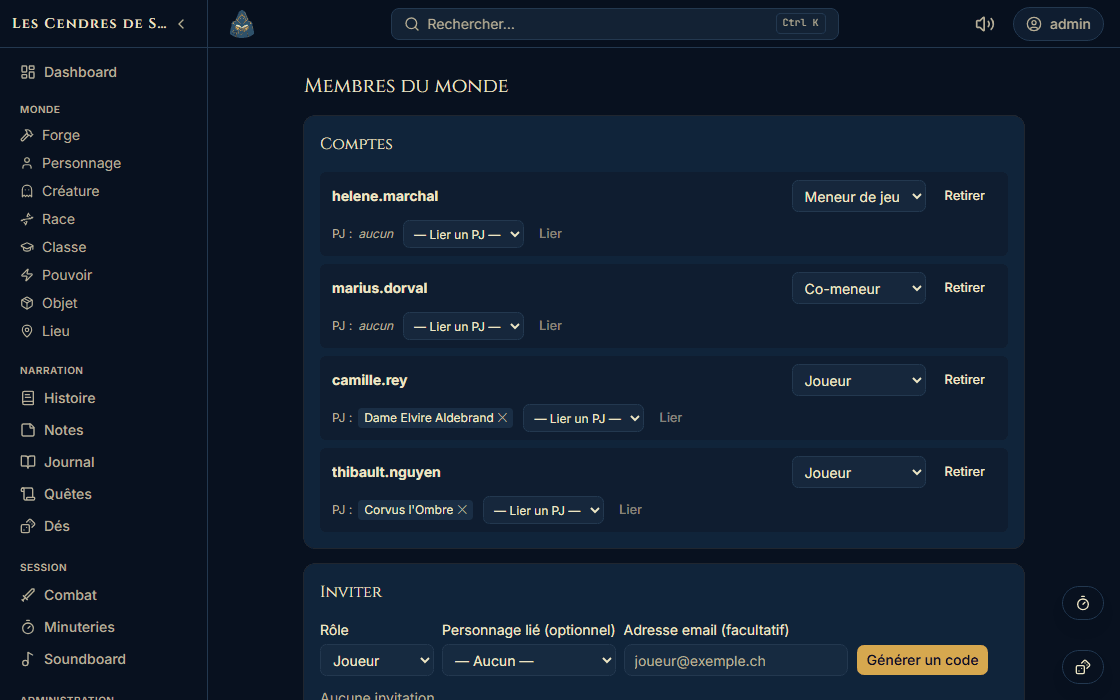
Opening up your world without losing control: three roles per world, and visibility set element by element.
- Game master: everything. Co-GM: content, combat and media, but not the world configuration. Player: they see what you share and edit only their own character.
- Visibility is set on three independent axes: each journal entry, each history article, and each sheet note (everyone, the player concerned, or you alone). You open things up as the story unfolds.
- What the player gains: their sheet up to date and edited by them, the session story to read between games, the game rules published as articles when the template provides them, their personal notes and their dice.
Your data stays yours
- Everything exports. A whole world in a single file, relations included, that Loreward can read back as is. You can also take away just one kind of sheet, or only the story, in a format that opens in a spreadsheet.
- Everything imports back. A preview shows you what is going to be created and what is going to be changed before a single write. Two destinations: a fresh world, or a merge into an existing one, without destroying anything.
- Hosting with Infomaniak, in Switzerland. No tracker, no analytics, no analysis subcontractor. Fonts and images are served from this domain: your browser contacts nobody else.
Questions about the features
Do my players see the fight live?
- No. Combat tracking, the soundboard and the timers are game master tools: they live on your device. Your players see the sheets, the journal, the quests and the articles you share, but they refresh their page to see your latest changes. Loreward is not a virtual tabletop.
Can I share my world publicly?
- No. A world is private and restricted to its members. There is no public showcase and no world page viewable without an invitation. If your plan is to publish your world for outside readers, that is not what Loreward does.
Is there a world map or a timeline?
- Not today. You can give your world a background image and create as many place sheets as you like, linked to each other, but there is no clickable map and no timeline. It is planned, it has not been started.
Do I need to know how to program to write a formula?
- No. A formula is written like in a spreadsheet: @strength * 5, or @level >= 5 ? 2 : 1. The editor suggests references when you type @, underlines the error at its exact position and refuses to save a calculation that would go round in circles. The guide on formulas starts from scratch.
Create my first world
Empty, or already filled in with your table's system. Free, no credit card, hosted in Switzerland.
The guides are only available in French for now.